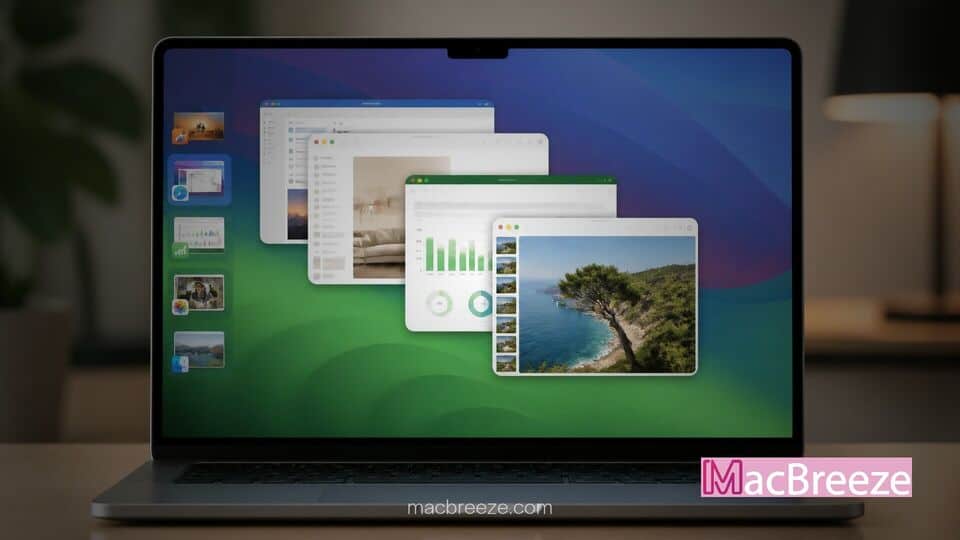
MacPlus Software has officially released Stage View 2, introducing expanded live window previews directly to Apple's macOS Stage Manager desktop organization system. The update provides users with rich visual thumbnails of every app inside a grouped stage, allowing seamless window switching without opening unnecessary applications.
Designed to fix one of the primary usability complaints surrounding Apple's built-in window manager, Stage View 2 operates silently alongside macOS. Users can hover over any grouped stage in the left hand sidebar to instantly inspect, open, minimize, or close individual windows without breaking their primary workflow focus.
Stage View 2 macOS Stage Manager Window Previews Overview
>The release of Stage View 2 brings clarity to complex multitasking setups by replacing small static stacked icons with interactive, full thumbnail popovers. Built natively for both Intel and Apple Silicon Macs, the utility gives power users quick actions to control grouped windows directly from hover previews.
Stage View 2 Adds Live Window Previews to macOS Stage Manager
When Apple introduced Stage Manager in macOS Ventura, the feature aimed to streamline cluttered screens by tucking inactive apps into a tidy vertical strip on the left side of the display. However, when users combine multiple applications or document windows into a single stage, identifying specific open documents becomes challenging because the native interface collapses them into tiny, stacked thumbnails.
Stage View 2 solves this problem by using Apple's modern ScreenCaptureKit and accessibility APIs to generate real time thumbnails. When the cursor hovers over a grouped stage, a dedicated popover panel opens to display each contained window alongside its corresponding application icon and file title. Users can customize the thumbnail size, set hover trigger delays, and select between Light, Dark, or Classic display themes to match their desktop aesthetic.
Key Features and User Interface Enhancements
In addition to basic visual inspection, Stage View 2 adds functional management tools directly inside the thumbnail popovers. Clicking any preview immediately brings that specific window to the foreground. A second click toggles focus back to the entire window group, making context switching faster than traditional keyboard shortcuts or Mission Control sweeps.
Hovering over an individual window thumbnail reveals controls to minimize, close, or expand the app to full-screen mode instantly. This allows users to clean up cluttered workspace groups without having to expand the group onto the main screen first. For additional flexibility, users can choose to suppress previews for single isolated windows, keeping popover overlays active only when dealing with multi-window stages.
How Stage View 2 Improves Mac Multitasking Workflows
Mac users who rely heavily on document heavy workflows, such as web developers, writers, and researchers, often find themselves running multiple browser windows alongside text editors and communication tools. While macOS offers several tools for window organization, adjusting settings like learning how to disable Liquid Glass on macOS Tahoe or configuring workspace preferences remains essential for maintaining visual clarity on desktop monitors.
By pairing live hover thumbnails with Stage Manager, Stage View 2 bridge the gap between Apple's aesthetic stage strip and functional window navigation. Users no longer need to rely purely on muscle memory or repeatedly cycle through windows using Command-Tab. Furthermore, Mac desktop management remains a key focal point for productivity enthusiasts, particularly as software updates continue to evolve alongside expected hardware cycles detailed in news like unreleased Mac models spotted in beta leaks.
Because Stage View 2 runs natively without persistent background polling, it operates with minimal memory and CPU overhead. Previews render only when the user explicitly triggers a hover state over the Stage Manager sidebar, ensuring system performance remains smooth even under heavy multitasking loads.
Compatibility and License Upgrade Details
Stage View 2 requires macOS 14.6 Sonoma or later and is fully optimized for macOS Sequoia and beyond. MacPlus Software has confirmed that the update is completely free for all existing Stage View license holders, who can transition to version 2 without purchasing a new registration key.
For new users, Stage View 2 is available directly from the developer's site for $7.99, with a free trial available for evaluation. Users who already own MacPlus Software's companion app DockView 2 should note that Stage Manager preview functionality is already integrated into DockView 2, meaning a standalone Stage View purchase is only necessary for those who do not use DockView.
As Mac desktop interfaces continue to grow more complex, third party utilities like Stage View 2 offer simple, targeted solutions that significantly improve everyday macOS usability.