Hands-on testing with Apple's newly announced foldable iPhone Duo has revealed a specialized display toggle designed to tackle protective case clearance. Discovered buried inside system preferences, the Shift Left Edge display setting creates an artificial border along the cover screen's hinge side to maintain full UI visibility.
The feature addresses a structural challenge unique to dual-screen and foldable devices, where protective case lips can overlap outer display edges. By offering software-level bezel adjustment, Apple aims to ensure both first-party sleeves and rugged third-party accessories function without covering critical touch targets or readable text.
iPhone Duo Shift Left Edge Setting Solves Outer Screen Obscuration
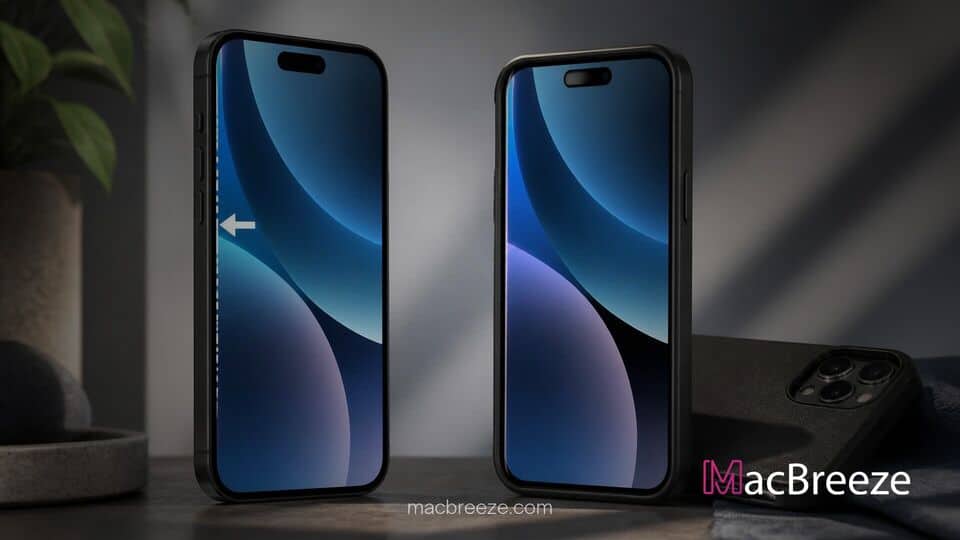
The iphone duo shift left edge setting works by introducing additional black padding directly adjacent to the physical folding hinge. When toggled on, the outer 5.4-inch display shifts rendered content slightly to the right, effectively doubling the apparent width of the left margin.
According to the official software description provided within iOS 27 on the device, the setting "moves content when you are using a case that partially covers the left edge of the outer display of your iPhone". Early hands-on footage demonstrates that turning on the setting instantly repositions app icons, wallpaper elements, and system text away from the display perimeter.
New Display Option Discovered in iPhone Duo Software
The toggle was first spotted by tech reviewer Nicolas Lellouche during initial hands-on access following Apple's product keynote. While navigating through the Display & Brightness menu on the cover display, Lellouche uncovered the dedicated switch.
Unlike standard iOS display scaling tools or Zoom modes, this feature specifically targets only one side of the panel. Standard display scaling adjusts the entire user interface uniformly, but Shift Left Edge exclusively alters the left margin. This surgical approach leaves the remaining three screen edges completely unchanged while maintaining original element sizing across the rest of the display.
How the Shift Left Edge Setting Functions
When active, the setting instructs the display compositor to apply a non-rendering zone along the left edge. Because the iPhone Duo utilizes an OLED panel for its outer screen, the newly created virtual bezel displays true absolute blacks, consuming zero additional power while blending seamlessly into the physical glass trim.
System controls on the outer display present a unique layout in iOS 27. Apple relocated major navigation bars, status indicators, and toolbars to the right side of the screen to optimize one-handed reachability and preserve vertical reading real estate. The left edge primarily borders the mechanical hinge mechanism. By shifting the rendered frame away from this axis, users can tap and drag edge elements without interference from raised case lips.
Impact on iPhone Duo Accessories and User Experience
Designing protective cases for foldable smartphones has traditionally posed significant engineering obstacles for accessory manufacturers. Because the hinge requires clear clearance to open 180 degrees, protective shells must clip securely onto slim perimeter frames without sliding off during motion.
To achieve a tight grip, third-party case makers often build elevated plastic or TPU overhangs along the cover display borders. Without software adjustment, these lips can block viewing angles or obscure interactive UI elements positioned right along the glass boundary.
Apple is shipping two official accessories alongside the flagship foldable: the minimalist two-piece iPhone Duo Case and the fabric-based iPhone Duo Folio with Kickstand. While Apple's first-party cases are engineered to precise tolerances, bulkier armor cases from third-party manufacturers will benefit significantly from the optional virtual bezel.
By embedding display adaptation directly into iOS 27, Apple provides accessory partners greater flexibility when engineering heavy-duty drop protection. Users who prefer slim profiles can leave the setting disabled for maximum screen space, while those requiring rugged protection can toggle the offset to ensure every pixel remains fully visible and accessible.