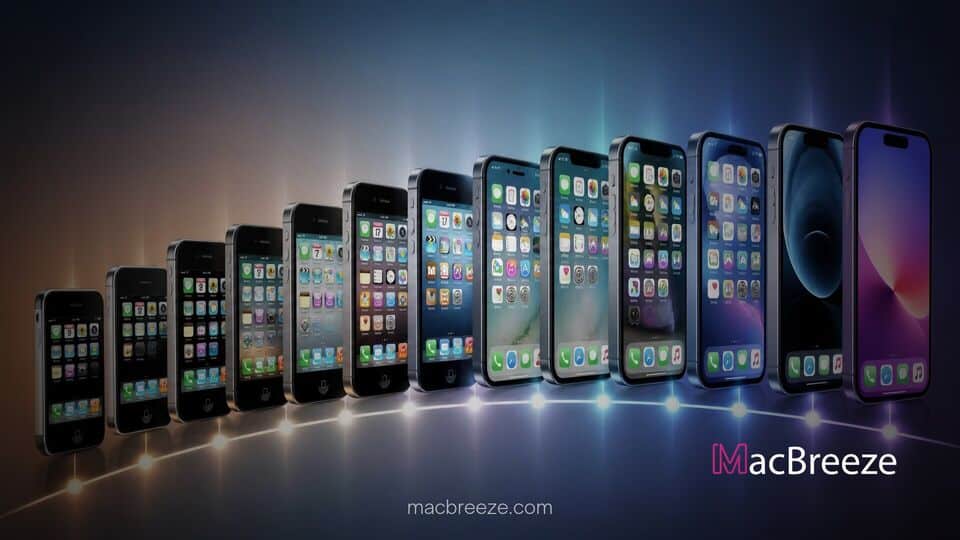
A new interactive web visualization project has captured two decades of mobile software history, offering users an intuitive way to explore the development of Apple operating systems. The tool maps every major interface milestone from the initial debut of iPhone OS 1 in 2007 up through the current release of iOS 27.
iOS Eras Interactive Timeline 20 Years iPhone OS Evolution Explored
The interactive web tool, named iOS Eras, provides an archival look at the visual and functional progression of Apple smartphone software over twenty years. Hosted on GitHub, the project features a responsive timeline slider that allows enthusiasts and developers to scrub through every annual release. As users move along the timeline, the virtual display renders changing icon layouts, status bar configurations, home screen docking aesthetics, and hardware cutouts. The project highlights how small yearly adjustments eventually culminated in a complete transformation of the user experience.
Beginning in June 2007, the software timeline opens with the original iPhone OS 1 running on 3.5-inch hardware. At launch, the system lacked fundamental capabilities that modern users take for granted, such as native third-party app support, custom home screen wallpapers, and cut-and-paste text tools. The timeline visually traces how the platform matured, capturing pivotal moments such as the introduction of the App Store in 2008, multi-tasking capabilities in 2010, and early notification center integrations.
New Interactive Web Tool Maps Two Decades of iOS History
The developer behind the project engineered the interface to show side-by-side visual updates while detailing underlying technical milestones. Users can watch the initial skeletal layout evolve into a feature-dense ecosystem capable of multi-modal AI processing and advanced system integrations.
By giving users a direct way to scrub between years, the project emphasizes how Apple slowly expanded system software responsibilities. While hardware advances were instrumental in shaping the physical handset, operating system overhauls dictated how millions of daily users interacted with digital services, mobile photography, and secure authentication methods.
Key Interface Milestones Highlighted in the Timeline
The visual catalog underscores four major structural design pivots across Apple mobile operating history:
- The Skeuomorphic Era (2007 to 2012): Defined by rich textures, glass reflections, leather stitching, and physical object mimicry under the direction of early software engineering teams.
- The Flat Design Era (2013 to 2016): Kicked off by iOS 7, this period removed realistic textures in favor of vibrant gradients, typography focus, edge-to-edge swipe gestures, and layered blur effects.
- The Full-Screen Era (2017 to 2021): Sparked by the arrival of the iPhone X, this era eliminated the physical home button, introducing gesture navigation and display cutouts like the notch.
- Dynamic and Liquid Interfaces (2022 to Present): Encompassing the dynamic island interface and modern fluid visual layers like the Liquid Glass aesthetic found on iOS 27 software builds.
Alongside design shifts, the timeline chronicles rebranding milestones. The tool documents the official name change from iPhone OS to iOS in 2010 following the debut of the iPad. It also logs structural shifts, including the separation of iPadOS into its own dedicated branch and the rollout of background intelligence features.
How the GitHub App Works and What Users Can Explore
Built as an open web application hosted via GitHub Pages, the timeline leverages lightweight CSS rendering and vector graphics to replicate home screen layouts dynamically. Visitors can toggle specific UI elements, such as showing or hiding system battery indicators, grid lines, default wallpapers, and hardware borders.
Interactive nodes throughout the timeline offer pop-up notes detailing contextual history. For instance, tapping on 2011 notes the arrival of iCloud and Siri, while selecting 2020 highlights home screen widgets and the App Library. The tool also contrasts current software updates against historical frameworks, showing how far mobile processing has advanced since early 32-bit single-core architectures.
Users exploring modern eras can see how system code expanded over time. Recent years reflect significant storage and resource requirements, as detailed in recent coverage of how the local footprint of Apple Intelligence expanded in iOS 27.
Reflecting on Apple Operating System Changes From 2007 to iOS 27
Community response to the interactive timeline has highlighted widespread nostalgia for earlier operating system eras. Tech historians and developers on social forums have noted that seeing two decades of user experience iteration in a single view underscores Apple's long-term design consistency.
While early software releases were aimed primarily at basic web browsing, media playback, and cellular communication, modern software handles complex tasks. Recent platform additions include adaptive controller configurations, detailed health tracking, and dedicated hardware toggles across flagship devices like the iPhone 18 Pro. As software updates grow increasingly focused on background processing and cross-device handoffs, interactive archival tools like iOS Eras offer an accessible record of how personal computing transitioned from desktop workstations to mobile displays.
The iOS Eras timeline remains free to access online, providing an open educational resource for designers, researchers, and general users interested in the history of smartphone software development.