Apple has updated its audio control system in iOS 27, allowing users to independently set volume levels for phone calls, alarms, and notification alerts. The overhaul addresses one of the longest-standing requests from iPhone users who have sought more granular audio customization options.
The updated functionality uncouples media playback, ringer intensity, alarm loudness, and system notifications. Previously, adjusting ringers and alerts meant modifying a shared slider, which frequently caused mismatched sound output across different system events.
iOS 27 Separate Volume Controls Ringtones Alarms
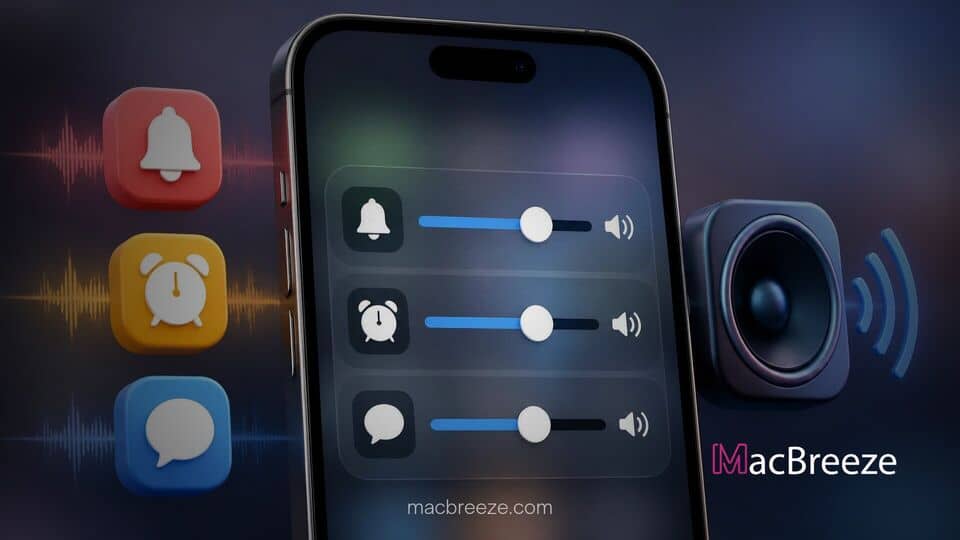
In iOS 27, Apple has revamped the core audio panel within the Sound & Haptics menu, replacing the unified system ringtone level with dedicated controls. The platform now delivers individual sliders for incoming calls, morning alarms, and general system alerts, permitting users to fine-tune each channel based on personal routine and environment. This change ensures that quiet message tones no longer require setting a jarringly loud alarm sound for the following morning.
Separate Sliders for Ringtones, Alarms, and Notifications
Under the new architecture, the main control layout provides distinct adjustment channels for three primary categories: incoming ringtones, alarm tones, and system alerts such as text messages or app updates. Each slider operates independently within the settings framework, eliminating the legacy behavior where a single master level dictated the output for all non-media audio events.
Furthermore, users can set precise decibel balances for each function. For instance, an individual who prefers a gentle tone for text notifications can lower that specific slider while maintaining a loud setting for incoming phone calls and morning alarms. This structure prevents inadvertent missed calls caused by turning down notification chimes during work hours.
How Independent Volume Adjustment Works
The updated settings interface utilizes real-time audio previews as users drag each individual slider. Adjusting the alarm slider instantly plays a snippet of the selected alarm audio at the current level, giving users immediate feedback on the sound volume before an alarm triggers in the morning.
Hardware control integration has also been refined. Users can choose whether the physical side volume buttons adjust overall media volume exclusively or modify the active audio context dynamically. If an alarm is sounding, pressing the volume keys adjusts only the alarm channel without disturbing the predefined ringtone baseline.
Usability Benefits for iPhone and iPad Users
The addition of independent sound sliders resolves daily usability friction for millions of device owners. Shift workers, heavy sleepers, and office professionals have long criticized the unified sound approach for forcing compromises between wake-up alarms and daytime notification levels. By separating these streams, users can configure high-volume morning alarms without enduring blaring notification sounds throughout the evening.
Accessibility benefits are equally prominent. Users with hearing impairments can configure high ringtone levels to ensure emergency calls are heard, while dialing back potentially distressing high-pitched alert tones for app updates. This level of customization mirrors long-standing audio management features on competing desktop platforms, bringing desktop-grade controls directly to mobile hardware.
The feature also pairs seamlessly with existing system refinements across the Apple ecosystem. As seen when Apple releases iOS 27 and iPadOS 27 Beta 7 for developers, system-wide audio pipeline enhancements have been tested rigorously to prevent conflicts between competing sound streams. The expanded control scheme is matched on iPadOS 27, providing unified audio configuration options across mobile form factors.
System Availability and Release Context
The revised volume architecture is built natively into iOS 27 and iPadOS 27. It requires no additional setup plugins or specialized background permissions, operating smoothly out of the box once the system update is installed on supported hardware generations.
This update arrives alongside broader platform refinements across the ecosystem. Recent releases have focused heavily on integrating system context and cross-device functionality. For instance, recent updates where Gemini for Mac updated with system-wide voice dictation and screen context demonstrate how platform developers are prioritizing granular user controls and contextual awareness. Similarly, tools like Stage View 2 released with live window previews for macOS Stage Manager highlight a growing push toward user customization across software platforms.
As hardware capabilities expand across future release cycles, software options that provide granular utility remain essential for daily tasks. Users preparing their devices for major updates should also review system management practices, such as when Apple explains how to speed up Spotlight indexing ahead of macOS 27, to ensure smooth performance across connected devices.
With iOS 27, Apple completes a long-overdue modernizing step for its mobile audio architecture. By giving users explicit authority over ringtone, alarm, and alert levels, the operating system eliminates daily sound management frustrations and delivers a significantly more adaptable user experience.