Apple has officially announced support for Sony's Access Controller across its mobile and desktop ecosystems, bringing broad new customization tools to players who require specialized input setups.
The update ensures that gamers using an iPhone, iPad, or Mac can connect PlayStation's highly versatile adaptive hardware seamlessly over Bluetooth or USB, allowing for a far more inclusive gaming environment across mobile and desktop platforms.
Sony Access Controller iPhone iPad Support Unlocks New Input Possibilities
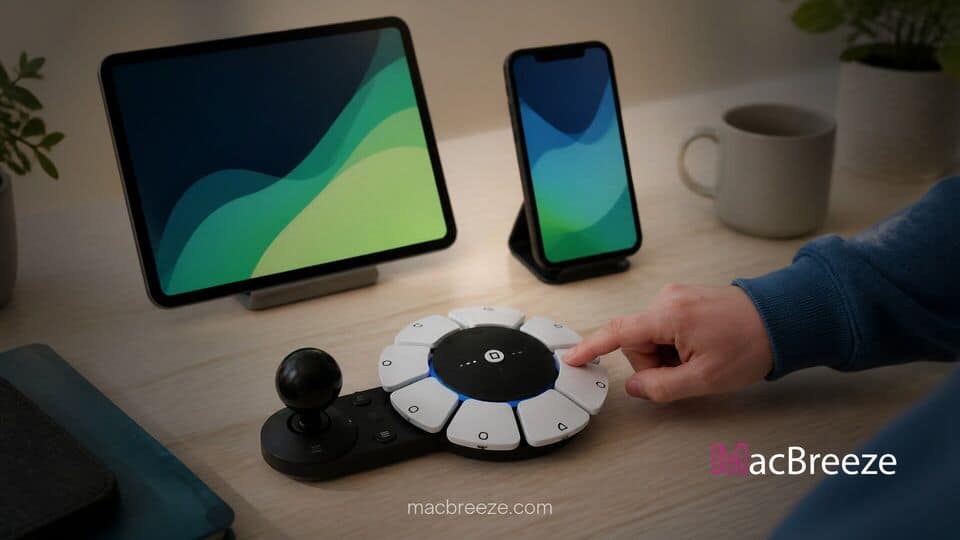
The addition of official support for the Sony Access Controller on iPhone, iPad, and Mac marks a significant milestone in software-level peripheral compatibility. Designed from the ground up to assist players with limited fine motor control, physical disabilities, or specific range-of-motion requirements, the Sony Access Controller features a modular circular design equipped with nine customizable buttons and an adjustable thumbstick layout. Under the expanded framework, players can utilize built-in settings in iOS and iPadOS to rebind actions, fine-tune analog sensitivities, and connect external auxiliary switches.
Key Customization and Controller Pairing Features
Beyond mapping built-in controls, the integration allows users to configure up to four 3.5mm expansion ports on the peripheral. These ports permit players to connect third-party buttons, foot switches, or specialized triggers directly into the Access Controller framework, translating external inputs into direct actions within supported App Store and Apple Arcade titles.
Apple has also confirmed support for dual-controller pairing. This capability allows two physical Access Controllers to be connected to a single device simultaneously, acting as a single unified gamepad. Players can map different parts of a complex control scheme across two distinct devices or pair the Access Controller alongside a standard iOS and iPadOS ecosystem setup. Additionally, Apple's existing Buddy Controller feature remains accessible, enabling a second player or assistant to share input responsibilities on a secondary gamepad to navigate tough in-game moments together.
Enhancing Accessible Gaming Across iOS and iPadOS
Over the past several years, Apple has steadily updated its operating systems to broaden native gamepad compatibility. While standard controllers like the DualShock 4, DualSense, and DualSense Edge have enjoyed deep system-level integration for some time, bringing adaptive control hardware into the fold closes a major gap for players with specific physical requirements.
Developers who target Apple platforms through the native Game Controller framework will automatically gain support for the peripheral without needing to rewrite custom control schemes. This functionality ensures that popular controller-enabled titles on Apple Arcade and native App Store games can immediately leverage the hardware's customized button mappings. Gamers can also take advantage of these adaptive inputs while streaming console and PC titles via remote play applications.
Supported Devices and Software Requirements
To pair and customize the peripheral, users must ensure their hardware is updated to the latest available operating system releases across iOS, iPadOS, and macOS. Controller settings can be accessed directly by opening Settings, selecting General, and tapping Game Controller on mobile devices, or through System Settings on Mac computers.
Connecting the controller requires entering Bluetooth pairing mode by holding the dedicated pairing button until the indicator light flashes, after which the accessory appears in the system Bluetooth menu. Alternatively, players can establish a direct connection using a data-capable USB cable. With expanded controller support rolling out, Apple continues to reduce barriers across its software landscape, giving a broader demographic of gamers equal access to their favorite mobile and desktop titles.