Internal testing builds of Apple software reveal that the company is experimenting with a brand-new interface design specifically tailored for dual-display hardware. The experimental feature introduces a vertical lock screen layout that repositioned widgets along the display margin, offering users quick access to glanceable information on dual-screen setups.
As Apple continues expanding software features for complex form factors, recent developer code suggests that lock screen customization will soon stretch beyond traditional single-panel constraints. The updated layout appears to target dual-screen devices like the rumored iPhone Duo, allowing key glanceable indicators to sit neatly along the outer edge of the display.
iPhone Duo Lock Screen Complication Column Tested in Internal Code
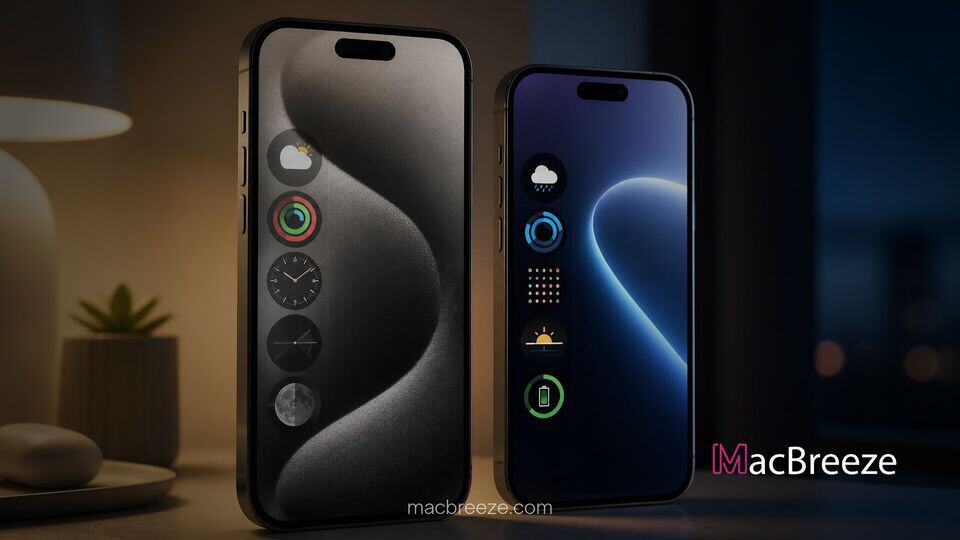
The code references point to a dedicated iphone duo lock screen complication column designed to take full advantage of dual-screen and foldable display real estate. In standard iOS releases, lock screen widgets sit horizontally directly beneath the primary clock display. However, this new internal layout moves widgets into a vertical stacked orientation along the right edge of the screen panel.
By shifting glanceable complications to a side column, the interface preserves central visual real estate for wallpaper imagery, depth effects, and active notifications. Testers note that the vertical column can host standard mini-widgets, such as battery status, weather conditions, upcoming calendar appointments, and fitness rings, aligned in a single streamlined strip. This structural change optimizes screen utilization without overcrowding the main display canvas.
iOS 27.1 Code Reveals Experimental Lock Screen Layout
References to the vertical widget structure were first uncovered within early system assets associated with upcoming iOS updates. The code indicates that Apple is exploring how to best split system tasks across multiple display regions. Similar multi-screen optimizations have previously surfaced across related software platforms, such as when Apple released iOS 27.3 beta 2 with expanded display options for next-generation hardware.
The system code describes an adaptive layout engine that dynamically shifts complication positions depending on whether a dual-screen device is folded shut, opened flat, or angled upright. When the device operates in a partially folded configuration, the lock screen complication column snaps to the active display border, making vital metrics readable from an angle without requiring full device interaction.
How the Right-Side Complication Column Works
Under the experimental framework, users can drag and drop complications into a dedicated vertical tray situated along the right display margin. Unlike traditional lock screen widgets that are limited to a horizontal row of four small icons, the vertical column supports variable-height stacks. This allows users to place a mixture of small circular indicators alongside expanded horizontal data bars.
Additionally, the vertical column responds to interactive touch inputs. Tapping a complication inside the side rail expands the widget into a compact view card without dismissing the overall lock screen context. Swipe gestures on the side rail enable scrolling through secondary widget pages, significantly increasing the total amount of accessible information from a locked state.
Implications for iPhone Duo Interface Customization
The introduction of a specialized lock screen layout highlights how Apple is refining its software paradigm for unique physical form factors. While conventional candy-bar iPhones benefit from centralized clock and widget placement, dual-screen hardware presents distinct ergonomic and visual challenges. Placing interactive widgets along the outer edge makes one-handed thumb interaction substantially easier when holding a dual-display device.
Furthermore, early logistics surrounding dual-screen production show Apple's increasing investment in hardware expansion. Recent reports highlighted how Apple improved iPhone Duo shipping estimates as manufacturing lines scaled up. Tailoring software features like edge-aligned complications demonstrates a concerted effort to ensure software interfaces keep pace with hardware developments.
What's Next for iOS Lock Screen Features
While the vertical complication column remains active in internal testing builds, Apple has not publicly announced an official release timeline for the feature. Software features discovered in developer builds are frequently refined, restructured, or held back for major system revisions depending on user testing feedback and hardware deployment schedules.
If finalized for consumer release, the vertical widget column could provide a template for broader lock screen customization options across other large-screen Apple devices, including iPads and foldable hardware. For now, the discovery confirms that Apple is actively designing specialized interface features aimed at maximizing the utility of non-traditional iPhone display configurations.